Building Your First Web Page: A Beginner's Guide with Examples Introduction: Embarking on the journey of creating your first web page can be an exciting venture. In this tutorial, we'll navigate through the creation of a distinctive web page using HTML and CSS. Join me on this coding odyssey as we unleash creativity and build a page that stands out from the rest. Step 1: Set Up Your Workspace Prepare your coding workspace by selecting a text editor. Create a new project folder to house your web page masterpiece. Open your chosen text editor with anticipation, ready to bring your vision to life. Step 2: Create the HTML Structure HTML is the thread that weaves the narrative of your web page. In your text editor, initiate a new file named `index.html` and commence with the essential HTML structure: html <!DOCTYPE html> <html lang="en"> <head> <meta charset="UTF-8"> <meta name="viewport" content="width=device-w...
Posts
How to paste image into picturebox from clipboard with VB.Net
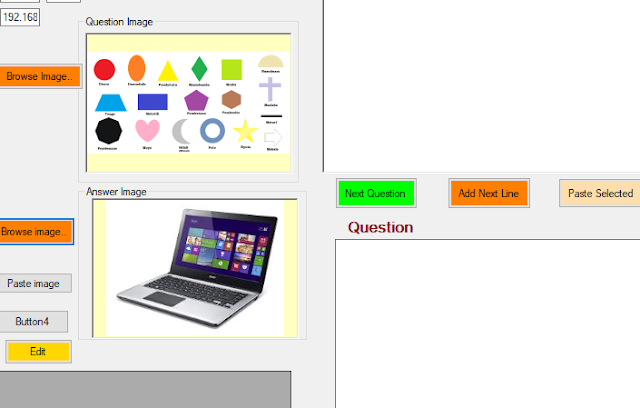
How to paste image into picturebox from clipboard with VB.Net If you wish to paste an image into a picturebox from clipboard for your VB.Net project, this is what to do: 1. Add a picturebox to your form. 2. Add a button and copy paste the code below. Private Sub btnPastePic_Click(sender As Object, e As EventArgs) Handles btnPastePic.Click 'If My.Computer.Clipboard.ContainsImage Then ' PictureBox1.Image = My.Computer.Clipboard.GetImage 'End If Dim idata As IDataObject = Clipboard.GetDataObject() If idata.GetDataPresent("System.Drawing.Bitmap") Then Dim imgObject As Object = idata.GetData("System.Drawing...
How to load MS Word Document files into a Richtextbox.
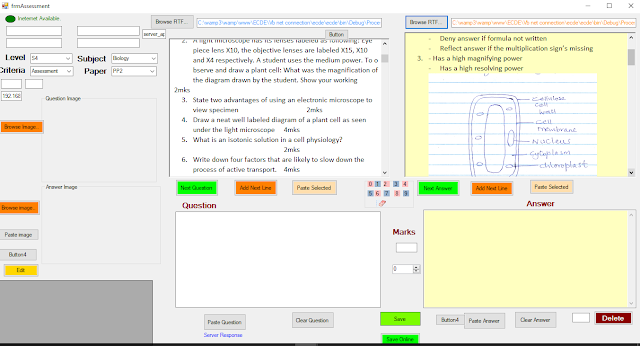
1. Start by saving the MS Word document as a richtext file. 2. Add the code below to a button. 3. Add a richtextbox to your project. You are good to go. Private Sub btnBrowseRTF_Click(sender As Object, e As EventArgs) Handles btnBrowseRTF.Click Dim saveDirectory As String = Application.StartupPath & "\ProcessedRTFS" Using openFileDialog1 As OpenFileDialog = New OpenFileDialog() openFileDialog1.Filter = "Richtext Files (*.rtf ) |*.rtf|All Files(*.*) |*.*" If openFileDialog1.ShowDialog() = DialogResult.OK Then If Not Directory.Exists(saveDirectory) Then Directory.CreateDirectory(saveDirectory) End If Dim fileName As String = Path.GetFileName(openFileDialog1.FileName) Dim fileSavePath As String = Path.Combine(saveDirectory, fileName) File.Copy(openFileDialog1.FileName, fileSavePath, True) 'txtImgName.Text = fileName txtPathRTF.Text = fileSa...
BUSINESS STUDIES MARKING SCHEME PP2 2017

565/2 MS BUSINESS STUDIES Paper 2 Nov. 2017 MARKING SCHEME THE KENYA NATIONAL EXAMINATIONS COUNCIL KENYA CERTIFICATE OF SECONDARY EDUCATION BUSINESS STUDIES Paper 2 MARKING SCHEME (CONFIDENTIAL) THIS MARKING SCHEME IS THE PROPERTY OF THE KENYA NATIONAL EXAMINATIONS COUNCIL AND IT MUST BE RETURNED TO THE KENYA NATIONAL EXAMINATIONS COUNCIL AT THE END OF MARKING. This Marking Scheme Consists Of 9 Printed Pages © 2017 The Kenya National Examinations Council 1. a). Ways in which the internal environment may contribute to the success of a business enterprise include: (Any 5 × 2 = 10 Marks) i. A functional / proper / good business structure: Formal arrangement of functions / the relationship of people that is directed towards achiev...